
How to Build a 13-Week Cash Flow Forecast in Excel

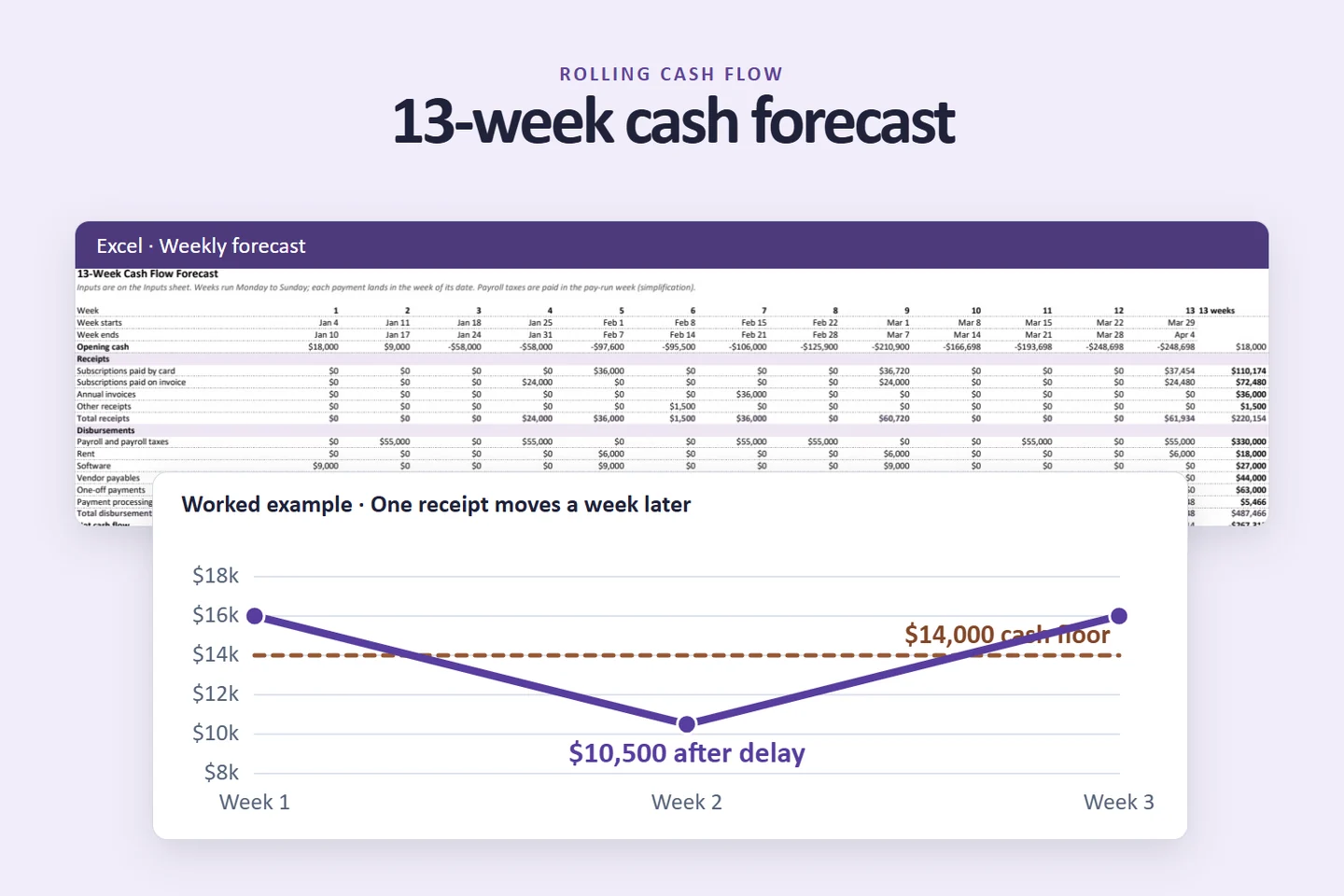
A 13-week cash flow forecast shows when money is likely to arrive, when it has to leave and which week needs attention. The weekly view is useful when a single delayed receipt can put a payroll or supplier run at risk. Start with money you can actually use. Then carry each week’s closing balance into the next opening balance and mark the weeks that fall below your operating floor.
Choose a fixed weekly cutoff and one starting balance
Pick the same day and time each week. Save a dated copy of the balances for the accounts included in the forecast. Identify anything already committed, restricted or held by a payment processor, and keep it visible separately. Use a starting balance you can reproduce from the account records. If a transfer between your own accounts is in transit, check both sides before adding the accounts to one total. Count that transfer once in an account-level plan and eliminate it from the consolidated operating inflow.
Decide how to handle transactions in the middle of clearing. A supplier payment shown in the books but still outstanding at the bank can be forecast as a future cash movement if you start from cleared bank cash. If you start from a ledger balance that already includes it, adding it again creates a duplicate. Record the chosen convention in the workbook and check the difference against the latest reconciliation. Start by forecasting in one currency and one clearly defined cash perimeter.
Forecast receipts from events that produce a bank deposit
List open invoices with the collectible amount, expected clearing date, source and owner. Record the contractual due date in a separate field. For a customer that normally pays ten days late, keep the due date in collections and use an evidence-based receipt date in the forecast. If the customer disputes part of a bill, use its agreed portion in the base scenario where the payment date is sufficiently supported. Keep the disputed amount in a separate row and consider when it can realistically clear.
A retailer can start with the payment processor’s settlement report and reconcile expected gross sales, fees, refunds and clearing lags to estimated deposits. A service business can use its invoice register and separately model renewals, deposits and milestone invoices for work not yet billed. Use a label for the source so the same transaction does not appear once as an invoice and once as a sales forecast. Leave lower-confidence pipeline as a separate assumption with a date and owner.
Schedule payments from actual commitments
Put unavoidable outgoing cash in first. Start with payroll debit dates, rent, debt service and approved supplier runs. Use supplier due dates and the actual payment calendar together. A Friday due date could require an earlier submission when approval or bank processing takes time. Use the full cash amount due for each payment, including relevant fees, and verify partial payments or credits against the supplier record.
Separate committed spend from requests still under review. A proposed equipment purchase, a new role or an optional software renewal belongs in a scenario when the timing is still up to the team. Show any likely existing obligation in the base case using its best available schedule. Put the conditions for changing a date in the Notes column. If an owner agrees revised terms with a supplier, retain the evidence and the original due date for future follow-up.
Calculate closing cash and headroom
In a simple Excel layout, keep one row per week with opening cash, receipts, payments, closing cash and an explanation. If payments are stored as positive numbers, closing balance is opening cash plus receipts minus payments. The opening of the next week references the previous week’s closing cell. Add an operating floor agreed by the team and a headroom column equal to closing cash minus that floor. A negative number is the amount by which the forecast misses the floor.
Worked example with one delayed payment
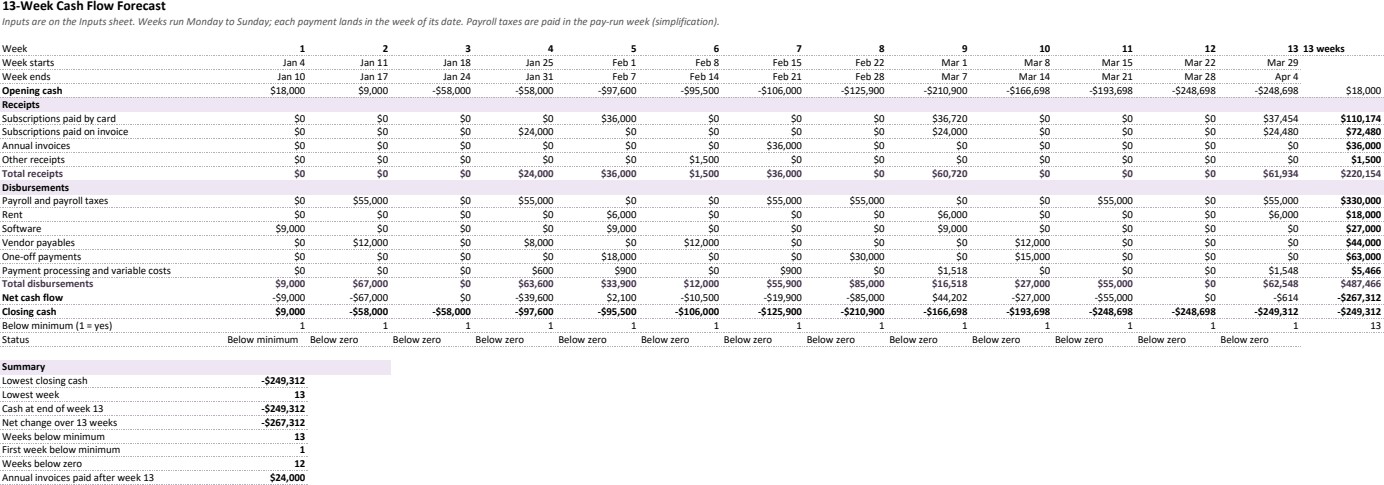
A distributor starts with $22,000 of cleared cash and keeps a $14,000 operating floor. It expects $6,000 of customer cash in the second week, including a $4,500 transfer whose date is still uncertain. A supplier run and payroll also fall in that week. The receipts and payments in the first three weeks are shown below. All figures are illustrative and in one currency.
| Week | Opening cash | Base receipts | Payments | Base closing cash | Delayed-case closing cash |
|---|---|---|---|---|---|
| 1 | $22,000 | $3,000 | $9,000 | $16,000 | $16,000 |
| 2 | $16,000 | $6,000 | $7,000 | $15,000 | $10,500 |
| 3 | $15,000 | $5,000 | $4,000 | $16,000 | $16,000 |
In week two, move the $4,500 receipt to week three. Revised week-two receipts are $1,500. Closing cash becomes $10,500 and the forecast’s low point is $3,500 below the operating floor. Revised week-three receipts are $9,500 and that week opens at $10,500. The business still closes week three at $16,000. Confirming or moving that one cash receipt matters even though the final week has the same result in both cases.
Open the week-two detail and sort by payment date. If payroll goes out Wednesday and the transfer can only reach the bank on Friday, build a daily view through that period. Give the receivable an owner and a time to confirm the transfer. Identify a specific purchase that can wait if necessary and the person authorised to reschedule it. Use a written decision deadline before the first date when action is required.
Save a baseline and roll the model forward every week
- Keep last week’s view. Save a dated version or add a snapshot tab. Preserve the week dates and the previous expected low point.
- Replace the finished period with actuals. Compare each large difference to bank and ledger records. Label it timing, amount or an omitted transaction.
- Refresh the next weeks. Update receipt promises, confirmed payroll and supplier instructions. Keep supporting references next to material changes.
- Add one new week. Carry the final closing balance forward and confirm the range still covers thirteen periods. Check totals and links before sharing.
- Send an exception list. Give each balance below your floor and each material unsupported receipt an owner, amount and decision date.
A useful forecast review distinguishes changes you can model from errors you need to correct. If the amount matches and only the date changed, keep the original expected date in the variance log. If a new obligation was entirely missing, verify which source should have provided it and add a check next week. If an older snapshot shows repeated late collections from one buyer, use that evidence to revise future assumptions instead of repeating the same forecast.
Identify whether a cash gap is operational or structural
Compare the base and delayed cases over the entire horizon. One negative week followed by recovery points to a timing problem that may have a specific receipt or payment owner. Several weeks of declining cash even under the base case suggest you need to challenge the underlying margin, sales volume or regular outgoing costs. Check the largest scheduled outflows against the approved budget and confirm when the forecast was updated. Put assumptions you cannot verify in a list next to the workbook. Share the week of the first risk with the person who can act on it and revisit the plan after the necessary information comes in.
Make the workbook easy for someone else to check
Keep the cash opening balance and assumptions in clearly labelled cells. On a copy, delay one receipt and verify the cash trough moves as expected and total receipts across the affected weeks stay constant. If the projected weekly balances do not chain together, inspect the opening balance references. If adding a payment does not change the expected week, check the date format and data range. Keep the test on a copy and use the recurring review to catch issues introduced by new rows.
Share a short summary ahead of the meeting. Include date of latest actuals, forecast low point and week, amount below the operating floor, and the three movements that determine that result. Next to each movement, name the evidence you have, the earliest date it can move and the decision the responsible person can make. For a monthly input or wider forecast, see the Australian government’s guide to cash flow statements and forecasting.
Which amount should I use if a payment includes fees?
Use the net amount expected in the bank if you are forecasting the deposit only. If your model tracks gross receipts and fees separately, put them in the same expected settlement period and verify that their net equals the expected bank deposit. Keep the approach consistent with your historical comparisons.
How many scenarios should I maintain?
Start with the best supported case and a focused downside event. Add a combined downside case when two exposures can hit at once and would trigger a different decision. Write one sentence about each case’s changed dates or amounts so the team can explain what it is comparing.
Use the 13-Week Cash Forecast Excel template to start with a manual weekly layout or an expanded Pro workbook with inputs, forecast and a liquidity calendar. Then bring a dated copy to your weekly cash review and monthly close.