
Competitor Analysis Best Practices: From Research to Action

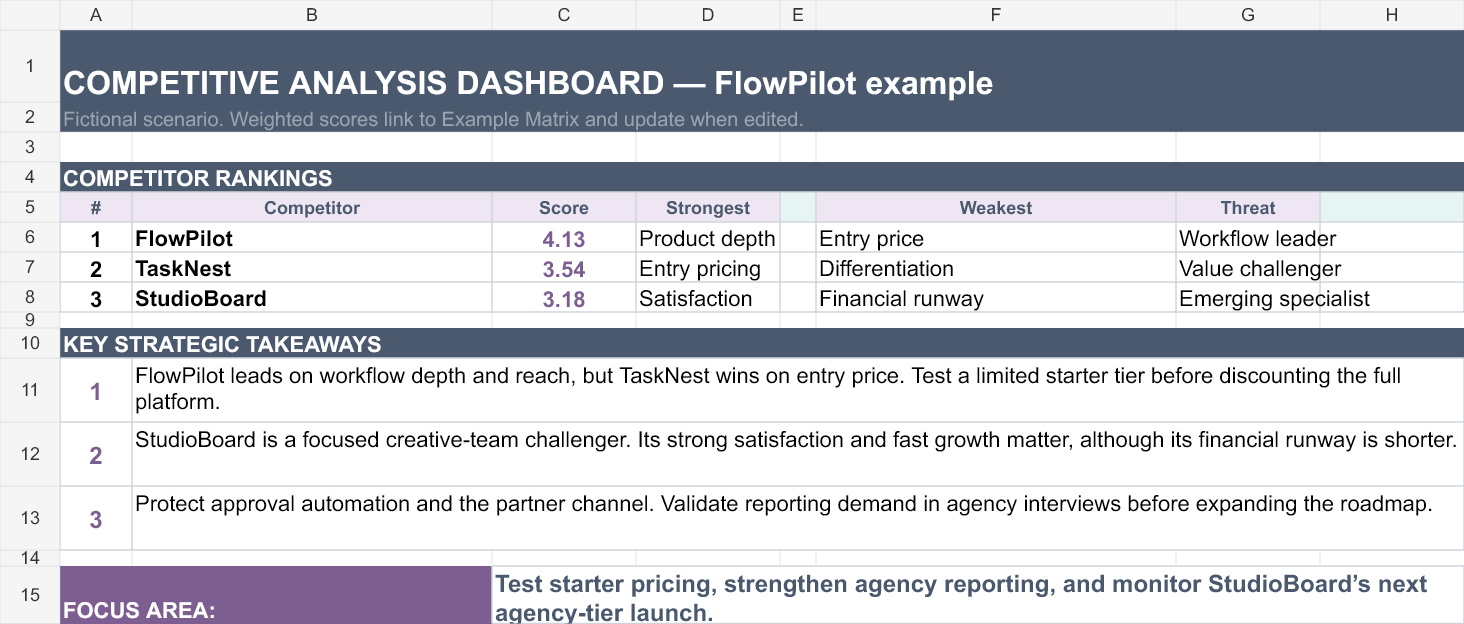
A competitor analysis should help you make a decision: which customer to focus on, which promise to lead with, or which product gap to fix next. A long list of rival features is useful only when it changes what you do.
This guide explains how to build an evidence-based comparison and use it in a marketing review. Follow along with the All Templates Competitor Analysis Excel Template: the free edition includes a roster and weighted matrix; the complete workbook adds deeper analysis and worked examples.
What is competitor analysis?
Competitor analysis is a structured comparison of the alternatives your customers can choose. It connects what you observe about those alternatives with decisions about your own offer.
The U.S. Small Business Administration’s market research guidance recommends assessing competition by product or service and market segment, including strengths, weaknesses, entry barriers and indirect competitors. That is a useful reminder to define the market before filling a spreadsheet.
1. Write the decision before collecting data
Put one question at the top of your research brief. For example: “What would make a 10-person agency choose our project-management software over its current tool?” Specify the audience, geography and buying situation. Comparing an enterprise procurement process with a freelancer’s self-service purchase will produce misleading conclusions.
Agree on the output before you start: three findings, the evidence for each, and one next action with an owner. This keeps the research bounded and makes it easier to stop when you have enough information.
2. Choose competitors your customers actually consider
Ahrefs’ lean competitive-analysis guide offers a practical starting point: identify a small set of direct competitors, then compare visibility, pricing, features, customer feedback and purchasing convenience. It also distinguishes websites competing for search traffic from businesses competing for the same customers.
For your first pass, use three to five direct rivals. Check this list against sales conversations and customer interviews. Keep indirect alternatives in a separate note: a customer may use a spreadsheet, hire an agency or simply postpone the purchase. A famous brand can be a useful reference without belonging in your core scorecard.
3. Build an evidence trail, not a collection of opinions
Use the table below as a research checklist. Record the exact source URL, date checked and relevant customer segment. Separate a company’s claim from an observed result. If you cannot verify something, mark it unknown and state what would resolve it.
| Research area | Evidence to record | Common mistake |
|---|---|---|
| Positioning | Homepage promise, intended customer and supporting case studies | Treating a slogan as proof of performance |
| Pricing | Plan, currency, billing period, seat minimum, limits and add-ons | Comparing an annual discount with a monthly price |
| Features | Documentation, plan availability and an observed workflow | Equating a feature label with a usable capability |
| Customer experience | Recent reviews, recurring themes and the reviewer’s use case | Generalizing from one enthusiastic or unhappy reviewer |
| Acquisition | Visible campaigns, landing pages and dated traffic estimates | Treating estimated visits as verified revenue |
| Buying process | Trial access, required steps, onboarding and cancellation information | Ignoring the effort required to get started |
Semrush’s competitive-analysis guide separates a brand’s own messaging from third-party coverage and what appears in AI search. Keep these observations separate in your notes. An answer generated by an AI tool is something to investigate, not independent verification of a competitor’s claims.
4. Make weighted scores explainable
The workbook’s Competitor Matrix compares your company with up to five competitors across six categories. Set category weights to total 100%, then score each dimension from 1 to 5. Choose the weights before you see the totals so you are less tempted to adjust them until your company wins.
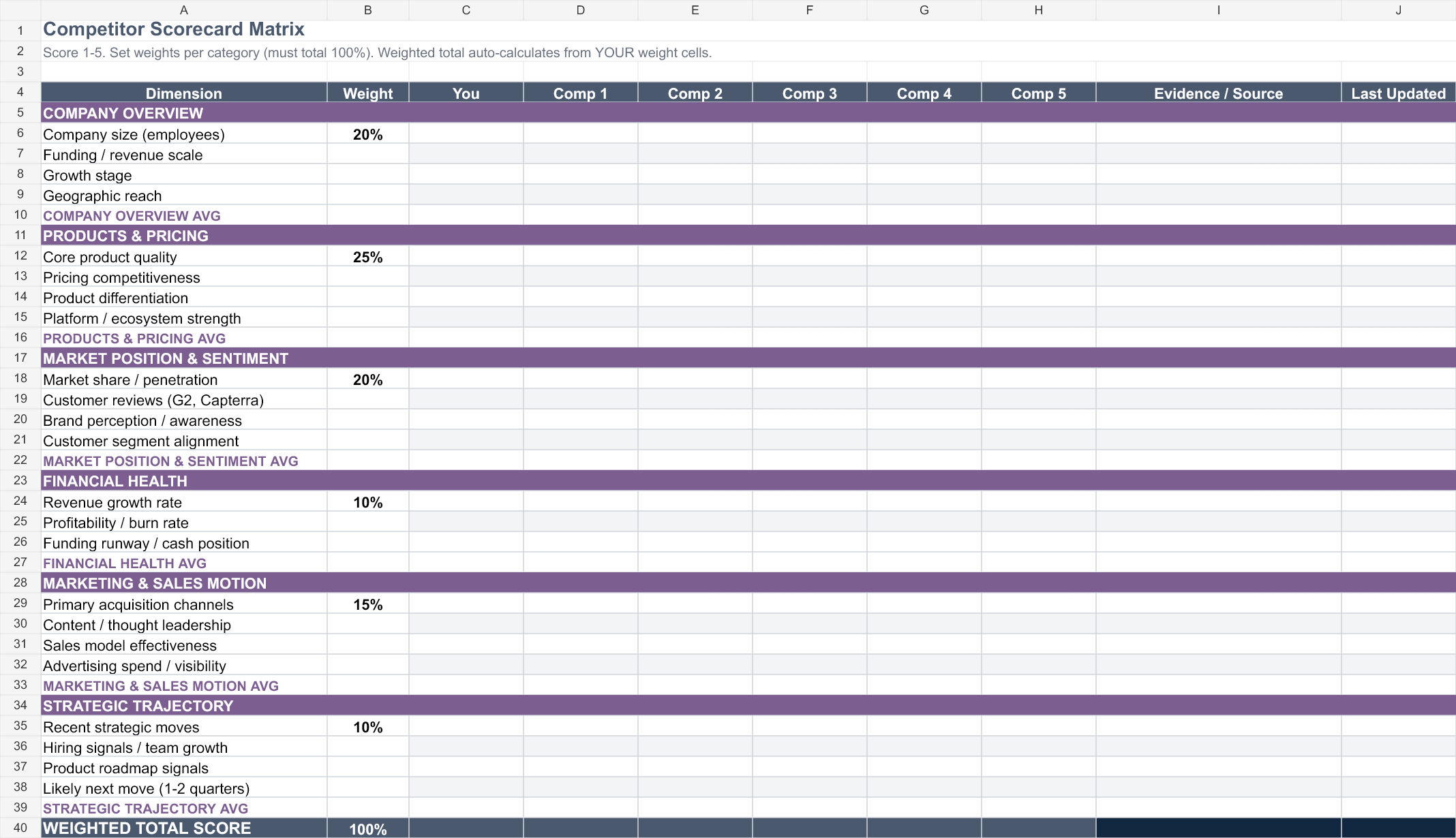
Write down what a low, medium and high score mean for each important criterion. For onboarding, for example, a high score might mean the target user can complete the first useful task without assistance. Test that workflow consistently instead of rating the appearance of the onboarding page.
Read the total alongside the evidence. A weighted score summarizes your chosen criteria; it does not prove market leadership. The matrix averages numeric entries, so incomplete research can make totals difficult to compare. Leave unknowns unscored and check that competitors have comparable coverage before ranking them.
5. Compare the cost of the same customer scenario
“Starts at $15” is not enough information for a pricing decision. Choose a common scenario, such as 10 users needing client approvals, and calculate what each alternative would cost for that scenario. Record mandatory upgrades and contract terms separately.
| Question | Product A | Product B |
|---|---|---|
| Displayed monthly price per user | $15 | $20 |
| Price for 10 users on that plan | $150/month | $200/month |
| Required approval workflow | Higher plan required; price not yet verified | Included in this fictional scenario |
| Research conclusion | Comparable total remains unknown | $200/month before any applicable extras |
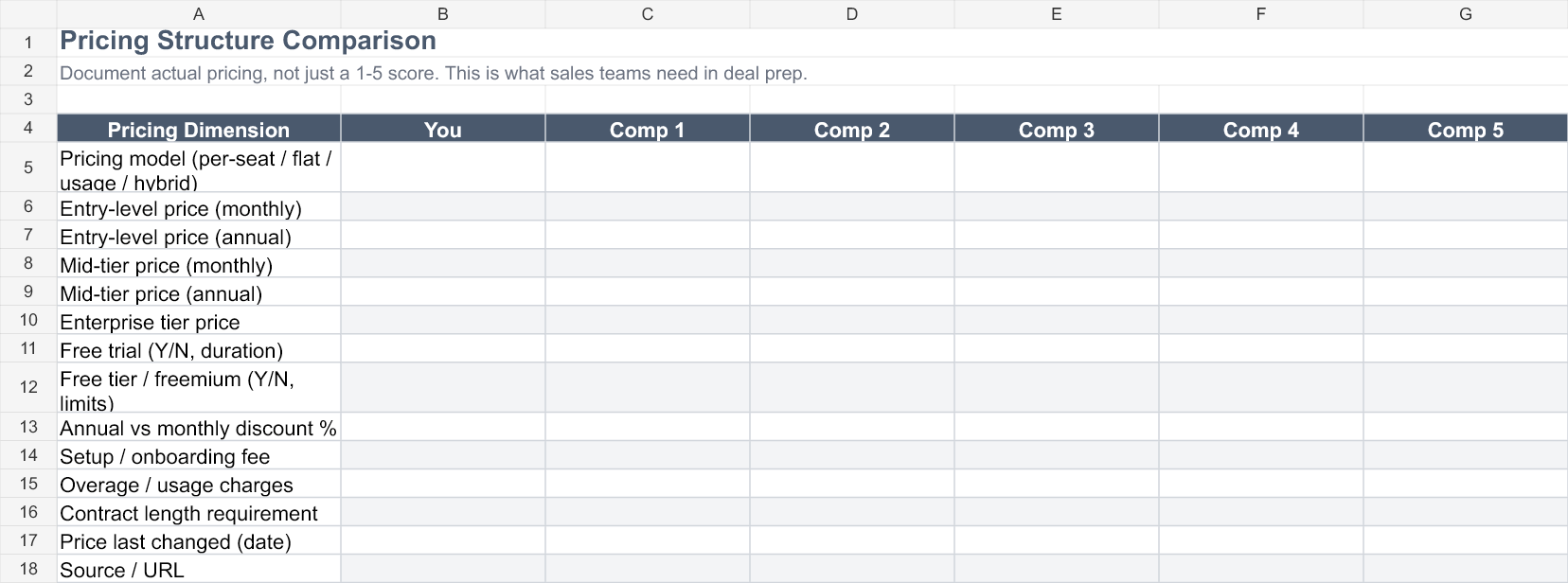
Do not conclude that Product A is cheaper for this customer until the missing plan price is checked. The useful finding is the uncertainty itself. Use the Pro workbook’s Pricing Detail sheet to keep the comparison organized.
6. Turn findings into testable actions
For each meaningful gap, write a short chain: observation, implication, next test. “A rival has more integrations” is an observation. “Our agency prospects repeatedly request one missing accounting integration” is a more useful problem statement, provided the interview evidence supports it.
Choose a response you can test. That could be interviewing five recent lost prospects, improving a comparison page, or validating demand for an integration before building it. Assign an owner, a review date and a result that would change your decision.
7. Keep the review useful over time
As a starting routine, review important pricing and product changes monthly and revisit the full comparison quarterly. Shorten that interval around a launch or a major competitor announcement. This is a suggested working cadence, not a universal benchmark.
Keep dated copies of consequential findings. A changed score should have a reason: a new release, a verified price change or fresh customer evidence. Do not overwrite the history and lose the explanation for an earlier decision.
Before you share the analysis
- Does every competitor serve the customer segment you defined?
- Are observations, estimates and assumptions clearly distinguished?
- Do prices use the same billing period and customer scenario?
- Do weights total 100%, and is scoring coverage comparable?
- Are unknowns visible instead of replaced with guesses?
- Does each priority have an owner and a next test?
Use the Competitor Analysis Excel Template
The free Competitor Analysis template includes Instructions, Competitor Roster and Competitor Matrix. The other tabs explain what is available in Pro and link to the product page.
The complete version costs $5 as a one-time purchase and includes all 10 worksheets: the three core sheets plus Pricing Detail, Gap Analysis, Feature Comparison, Example Matrix, Example Summary, Win-Loss Analysis and Summary. It is an editable .xlsx workbook; competitor research is entered manually.
View the template and download the free version
Sources and further reading
- Ahrefs: Competitive Analysis — The Lean Guide, by Mateusz Makosiewicz. A practical reference for keeping a comparison focused.
- Semrush: What is competitive analysis? How to do one, by Alex Lindley. A broader look at brand messaging, third-party coverage and visibility.
- U.S. Small Business Administration: Plan your business, market research and competitive analysis section.
This guide’s checklist, illustrative pricing scenario and workbook walkthrough were prepared for All Templates. Screenshots show the All Templates workbook.
Starting with the decision makes this feel much more manageable. I also like the point about comparing the cost of the same customer scenario. Comparing the headline prices alone leaves too much room for interpretation.