
How to Do a Bank Reconciliation in Excel With a Worked Example

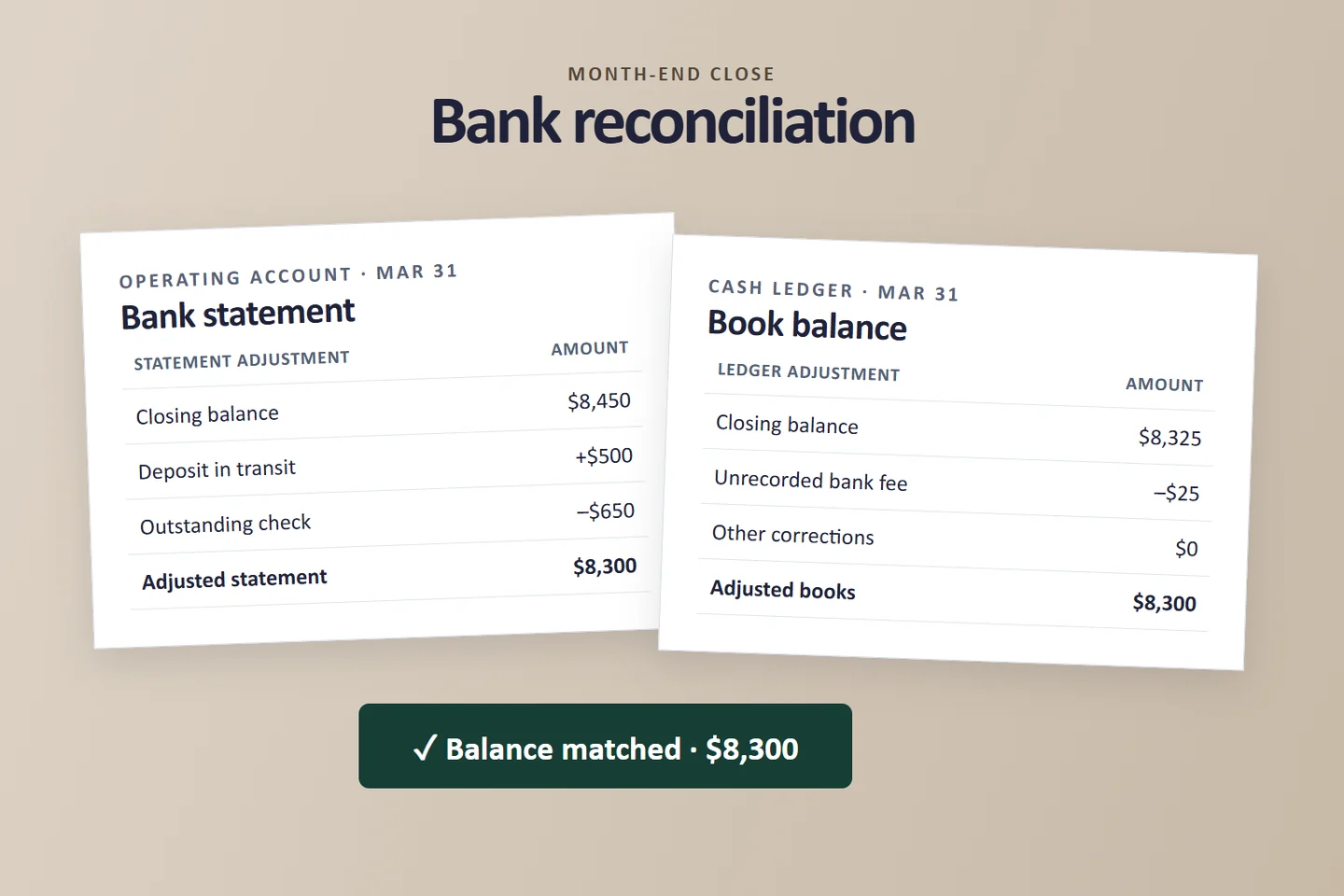
A bank reconciliation explains the difference between what your bank statement shows and what your books show as of the same date. Some differences are ordinary timing. Others need a correction in the books. A useful Excel reconciliation records which kind each item is, keeps evidence beside it and shows that adjusted statement cash and adjusted book cash agree.
Set the scope before pairing transactions
Pick the account, currency, statement period and cutoff date. Get the actual statement and the corresponding ledger export. Save dated source copies in the approved location. Check that you have the whole period and that the prior reconciliation’s entries and outstanding items are available. If the current statement begins at a different balance from the preceding statement’s ending balance, verify the account, date range and statement sequence before importing more rows.
Use one line per bank transaction and one line per ledger movement in input tables. Keep source row references and signed amounts. Store transaction and statement posting dates in separate fields when your source has both. Include a description and any unique payment or deposit reference. Normalise date and amount formats in a working copy and keep the original exports available so a reviewer can trace every change.
Match references first and investigate the ambiguous rows
A unique reference plus a matching amount is a strong candidate. Check dates within the range expected for that payment type. When several rows have the same amount, use a combination of source identifier, payee, clearing window and documentation. A processor deposit may represent many sales less fees and refunds. Use its payout report to reconcile the component transactions and the net amount to the statement. Record a one-to-many or many-to-one match explicitly so no row is reused.
Do not treat a similar description or an exact amount as sufficient when the account has recurring payments. If two $400 expenses exist and one clears, attach the evidence for the specific match and leave the other unresolved. A duplicate in the ledger can make the pair look correct while doubling the expense. Flag any unusual combination on the working sheet and ask the relevant owner for the source evidence.
Worked example with an outstanding cheque and a missing bank fee
At March 31 a small business has a statement balance of $8,450 and a book balance of $8,325. All amounts are in one currency. The business recorded a $500 deposit on the cutoff date, which the bank showed in April. It issued a $650 cheque already recorded in its books, which had not cleared by March 31. The statement includes a $25 fee absent from the books.
| Bank side | Amount | Book side | Amount |
|---|---|---|---|
| Bank statement closing balance | $8,450 | Ledger closing balance | $8,325 |
| Add deposit in transit | +$500 | Record bank fee | −$25 |
| Subtract outstanding cheque | −$650 | Other corrections | $0 |
| Adjusted statement balance | $8,300 | Adjusted book balance | $8,300 |
Both adjusted sides equal $8,300. The deposit and cheque are already in the ledger, and they are listed as timing adjustments on the statement side. The fee needs a book entry whose reference should be recorded in the reconciliation. After it is posted, run the book view again and check that the new closing balance is $8,300. Compare the two timing items with April’s first bank activity to confirm they clear.
Use an exception queue that survives month-end
Give each unmatched row a status, a source reference, an amount, an owner and a follow-up date. For cleared timing items, capture the statement and date on which they cleared. For a book adjustment, capture the journal reference or approved correcting entry. For a suspected bank error, retain bank communications and track resolution until there is evidence. Ask a second person to review a material unresolved amount where your process permits it.
When a cheque remains outstanding beyond its normal clearing time, confirm whether the recipient received it and consult the company’s process for old or voided payments. A lost cheque, an unprocessed transfer and a duplicate posting require different actions. Keep the original entry and the documented correction together. Do not plug the difference to an account just to produce zero.
Test the workbook before taking its total to the close
- Recheck completeness. Add the statement movements to the starting balance and compare with the statement ending balance. Do the equivalent with the ledger extract.
- Recheck signs. Follow one deposit and one outgoing payment through each table. Inspect how credits, refunds and account fees appear. Verify that debits and credits use the agreed sign convention.
- Recheck links. Select a transaction marked matched and trace it to both source rows. Pick one transaction marked missing and check it was not used in another group.
- Recheck the adjustment. On a copy, add a real example of a missing fee and confirm it fixes the book-side difference. Confirm that recording the cheque a second time produces a discrepancy that you can explain.
- Recheck the dates. Open the prior and next statements for outstanding items and save the evidence of clearing without changing the signed-off prior snapshot.
A filter, a hidden row and an input range that excludes a new transaction can all lead to a misleading total. Unhide or inspect excluded rows before sign-off. Compare the imported row count and total with each source. If someone recently changed the reconciliation layout, test a deposit, a payment and a one-to-many match on a copy before using it for a reporting close.
Handle inter-account transfers, processors and card activity
Reconcile each bank account separately even if two accounts feed one cash dashboard. A transfer out of one account and into another should match its own pair of bank and ledger references. If one side clears after the cutoff, document the timing on the affected reconciliation and avoid treating the company’s transfer as sales income. Read the two account statements together before deciding how to present the consolidated cash movement.
If a processor pays out daily, save the settlement report for the date range and reconcile a sample deposit end to end. Record sales, refunds, chargebacks and processor fees once using the accounting workflow already in place. A credit card repayment is a transfer to settle a balance. Expense records should still be traceable to the purchases reported on the card. Inspect both payment and detail sources before treating a difference as a missing expense.
Trace a grouped processor deposit
Suppose the bank shows one $1,170 deposit for a processor settlement. Its payout detail shows $1,300 of collected sales, $90 in refunds and $40 in fees. The settlement net is $1,170. Check that the accounting exports contain the corresponding components or a traceable net settlement through the clearing account. Link the deposit to the unique batch ID and record all three components in the match detail. If only $1,210 was expected before the fee was posted, use the payout report to explain the $40 and verify the accounting entry. Document the payout period and settlement ID beside the matched bank line. Reconcile the next payout independently so the fee does not get recorded again on a connected bank import.
Save a review packet with enough evidence to reproduce the result
Keep the dated statement, ledger export, matched items, reconciling items, adjustments and reviewer notes. Summarise starting and ending balances on both sides and identify any entry still provisional. Name the next responsible person and review date for every open item. At the next close, start by clearing or explaining the carry-forward list before creating new adjustments. For a U.S. small-business example, see IRS Publication 583 and its explanation of reconciling a checking account.
What if my statement and ledger totals differ by just a few cents?
First check decimal and currency rounding, processor fees and applied tax or transaction amounts. Compare the source before using an approved rounding treatment. Keep an amount and a reason with any adjustment. A small difference that recurs each month can reveal a formula or import error.
Should I copy prior outstanding entries into the new workbook?
Carry forward items that have not cleared with their original reference, transaction date and amount. Identify when they were added to the reconciliation and inspect the new statement for a match. Save the current status separately from the signed-off record from the prior month.
How do I recognize a missing ledger transaction?
Start with a bank line that lacks a matching book entry and confirm the same money has not been recorded as part of a group. Check the supporting document, payment reference and period. If a correction is appropriate, post it through the usual accounting process and keep the entry reference for the next reviewer.
Use the Bank Reconciliation Excel template to compare statement and ledger lines. Try the manual worksheet to see the signed amount convention, or use the Pro workbook for account views, transaction detail and monthly reconciliation. Bring the adjusted cash balance and open items to your monthly finance close.