
Business Model Canvas for Google Slides
3,00 $
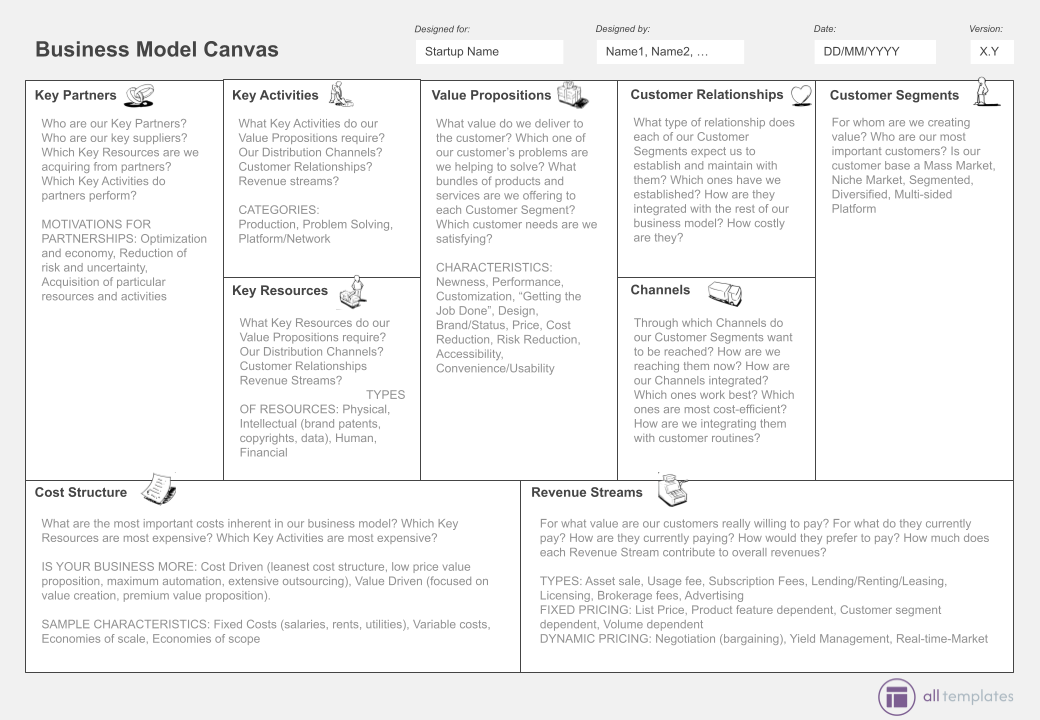
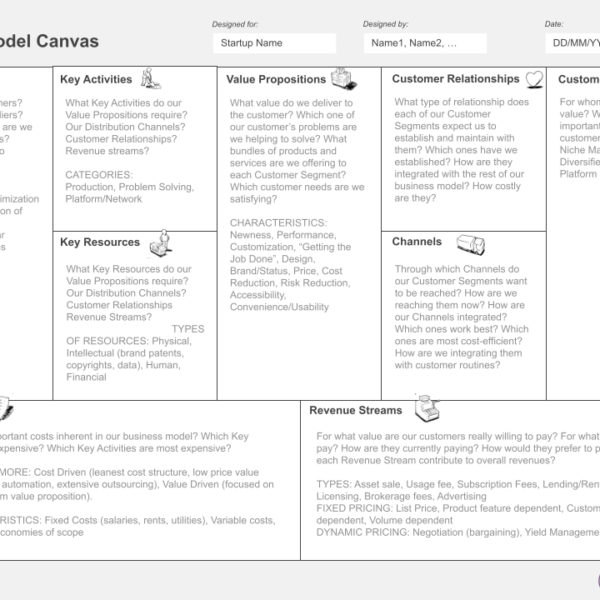
Use a nine-block Business Model Canvas template in Google Slides. Preview the whole canvas as a single image for free, or use Pro to edit the blocks and run a collaborative workshop.
- AI-friendly. Ask an AI agent to draft text for the nine blocks. An agent with Slides access can add it to an editable Pro copy. The free slide is an image preview.
Free downloads vary by product. See the description below for exactly what is included, or get the complete Pro version.
Get the complete, ready-to-use version with all features — for the price of a cup of coffee
Use one slide to discuss how a business serves a customer, earns revenue and delivers its offer. Free gives you a picture of the full nine-block layout to inspect, print or show in a meeting. Pro gives you the editable Google Slides canvas for a workshop or a working business model.
Free and Pro comparison
| What you want to do | Free image preview | Pro Google Slides canvas |
|---|---|---|
| Inspect the layout | One slide containing a single picture of the canvas | One slide with the nine working blocks |
| Change text inside a block | The headings and text are part of the image | Select a text box and replace its guiding questions |
| Work through assumptions | Refer to the layout while taking notes elsewhere | Enter your segment, offer, channel, activities, partners, resources, costs, revenues and customer relationships |
| Compare alternatives | Duplicate the same static preview | Duplicate the slide and edit each model separately |
How to use the template
- Choose Free Download to see the layout, or open the Pro link from your order. Sign in and choose Make a copy to save the slide to your Drive.
- In Pro, start with one customer segment and the specific outcome that makes that customer buy. Replace the prompts with short statements that fit on the slide.
- Trace one sale from discovery to payment. Fill in the channel, relationship and revenue blocks before listing the work and partners required to deliver.
- Duplicate the slide before the next workshop. Date each version and use comments to record the evidence behind a changed assumption.
Practical use cases
- Founder testing a service. Compare a paid pilot with a recurring subscription on separate slides. Change the payment unit, sales channel and delivery costs together.
- Product team planning a workshop. Give collaborators editing access to a working copy. Ask each group for one assumption that could invalidate the model.
- Consultant reviewing two customers. If the buyer and the end user differ, name both and identify who approves the spend.
For desktop presentations, see the PowerPoint edition. The canvas workshop guide walks through filling in and testing a model.
Run a 60-minute Business Model Canvas workshop in Google Slides
Jump to the practical guide, worked example and FAQs
Try it with a worked example
In a team session, give each person one assumption to challenge. For a meal subscription, test whether office workers value a predictable delivery time enough to renew. Record the evidence beside the relevant canvas block before exporting the slide.
All you need to know about building a Business Model Canvas in Google Slides
A useful canvas lets a reader trace one customer from a problem to a payment, then see what it takes to deliver the promise. Put one model on each slide.
Build the foundation
- Pick one business model. Use a separate canvas when customer, offer or revenue mechanics differ substantially.
- Start with the customer. Describe a specific group and the problem that makes it look for an alternative.
- Tie the value proposition to behavior. Look for a purchase, workaround or observable struggle that shows the problem is real.
- Define the channel journey. Describe where the first contact happens and how it becomes a sale.
- Describe customer relationships. State who handles onboarding, support and renewals.
Put it into practice
- State how revenue works. Identify the payer, price unit and collection timing.
- List the activities and resources. Include what is necessary to deliver the promise consistently.
- Name essential partners. Record which outside capability matters and what happens if it is unavailable.
- Estimate the main costs. Compare the cost of serving one buyer with the revenue it generates.
- Test the riskiest assumption. Define an action, sample and pass threshold before interpreting results.
- Keep the nine blocks readable. Replace long paragraphs with one claim per line. Put interview quotes and caveats in speaker notes or a linked research document.
- Give the workshop a decision. Ask whether to test a particular segment, price or route to market. Record the decision and the evidence needed for the next review.
- Version the model. Duplicate the editable slide before changing the offer. Date both slides so a reviewer can tell which assumptions changed after the pilot.
Frequently asked questions
What are the nine blocks?
Customer segments, value propositions, channels, relationships, revenue, resources, activities, partners and costs.
Which block should I fill first?
Start with a customer and a problem, then test how the offer creates value.
Are users and customers always the same?
A user may use the product while another person or company pays for it.
Do I need a canvas for every segment?
Use separate versions when the offer, route to market or economics change materially.
Is it a replacement for a financing plan?
A canvas summarizes the model. Financing often needs a full forecast and supporting evidence.
How do I pick the riskiest assumption?
Ask which uncertain claim would force the largest change if it were wrong.
How can I test willingness to pay?
Offer a realistic next step such as a paid pilot or deposit where appropriate.
What counts as a key resource?
An asset or capability essential to delivering the offer, such as staff, equipment or rights.
Should I include cost estimates early?
Include estimates and label uncertainty. Update them after getting real quotes.
When do I revise a canvas?
Revise it when new evidence changes a material claim and date each version.
How do I capture disagreement in a shared canvas?
Write the competing assumptions on two copies of the slide. Attach a test, an owner and a decision date to each. Keep research notes with the version they informed.
Marek Wójcik –
The nine blocks on one editable slide are exactly what I was after for a workshop. Simple to share with the group.
Giulia Marchetti –
The editable slide looks useful, though the free image only gives me a quick overview. I’d like to see two filled business models compared.